
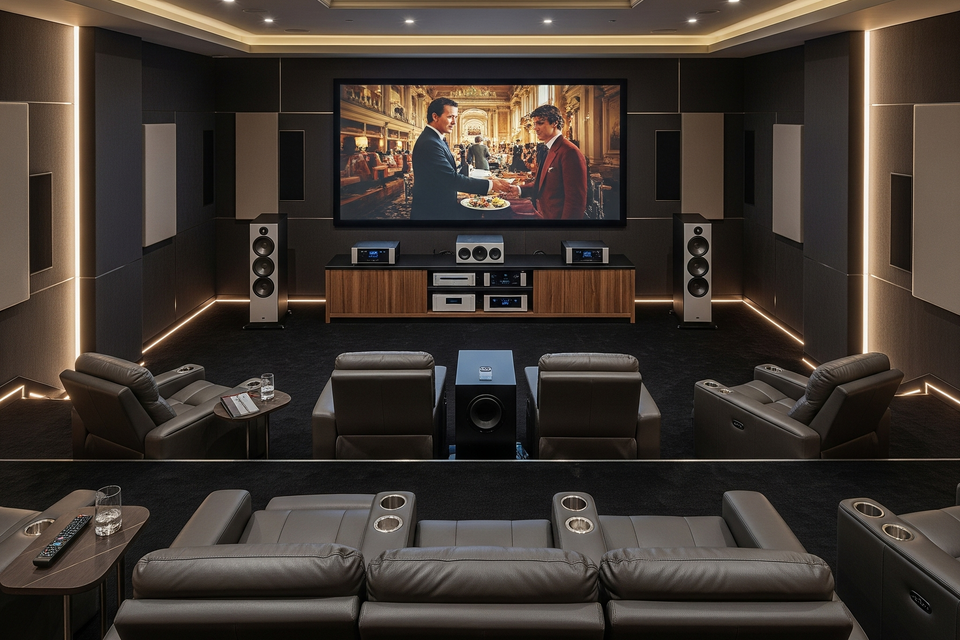
Unlock the Ultimate Cinema Experience: A Professional Home Theater Buying Guide
Setting up a professional-grade home theater is an exciting but complex project. It's more than just buying a big TV and a soundbar; it's about creating a dedicated, immersive environment that rivals a commercial cinema. This guide will walk you through the key components and considerations for building a truly professional home theater.
1. The Room: Your Foundation
Before you buy a single piece of equipment, consider the room itself. A professional home theater is built from the ground up to optimize the audio and video experience.- Size and Shape: The dimensions of your room are crucial. A larger room can accommodate a larger screen and more powerful speakers, but it also requires more planning for acoustics. The ideal shape is often a rectangle, and some professional designers even use specific ratios (like Volkman's or Sepmeyer's) for optimal sound.
- Lighting Control: The best home theaters have no ambient light. You'll need to control all sources of light, including windows and doors. Blackout curtains or shades are a must. The walls and ceiling should be a dark, non-reflective color to prevent light from the projector from bouncing back onto the screen.
- Acoustic Treatment: This is a key differentiator for a professional setup. Bare walls create echoes and muddy sound. Consider adding acoustic panels to the walls, bass traps in the corners, and even ceiling treatments to absorb sound and improve clarity. This will make dialogue crisp and effects impactful, without the "boomy" or distorted sound of an untreated room.
2. The Video: Projector vs. TV
This is your central viewing component. While large flat-panel TVs are getting bigger and more affordable, a high-quality projector and screen remain the gold standard for an authentic cinematic experience.-
Projector: For a true theater feel, a projector is the way to go. You can get a much larger image (100 inches and up) for a fraction of the cost of a TV of a similar size.
- Resolution: 4K UHD (3840 x 2160 pixels) is the current standard for professional-grade projectors. Look for native 4K or high-quality pixel-shifting projectors for the sharpest image.
-
Light Source:
- Lamp: Traditional, more affordable, but requires lamp replacement every few thousand hours.
- Laser: More expensive but offer a longer lifespan (often 20,000+ hours), better brightness, and more consistent color.
- LED: Similar benefits to laser, but often with lower brightness.
- Brightness (Lumens): Measured in lumens, this determines how well the image holds up in a room with some ambient light. For a dedicated, dark room, 2,000-3,000 lumens is often sufficient. If your room has some light, you'll need a higher lumen count.
- High Dynamic Range (HDR): Look for support for HDR formats like HDR10 and HLG for a wider range of colors and contrast.
-
Screen: Your screen material and type are just as important as the projector.
- Fixed-Frame: The best choice for a dedicated home theater. It's permanently mounted on the wall and holds the screen surface perfectly flat, which is essential for a sharp image.
- Motorized: A good option for multi-purpose rooms where you want the screen to disappear when not in use. A "tab-tensioned" screen is recommended to keep the surface flat.
- Aspect Ratio: 16:9 is the standard for most content, but some enthusiasts opt for a wider 2.35:1 "Cinemascope" screen to perfectly fit Hollywood movies without black bars.
- Ambient Light Rejecting (ALR) screens: If your room isn't fully light-controlled, an ALR screen can help. It's designed to reflect the projector's light back to the audience while rejecting light from other angles.
3. The Audio: The Heart of the Experience
A professional home theater's audio system is what truly sets it apart. It's not about a single box, but a collection of components working in harmony.-
Receiver/Amplifier: The "brain" of your system. A high-quality AV receiver decodes the audio and video signals and sends power to your speakers.
- Channels: This is indicated by numbers like 5.1, 7.1, or 9.2.4. The first number is the number of speakers, the second is the number of subwoofers, and the third (if present) is the number of overhead speakers for Dolby Atmos/DTS:X. A 7.1 or higher system is recommended for a professional setup.
- Connectivity: Look for multiple HDMI inputs, support for HDMI 2.1 (for 4K/120Hz gaming), and eARC (Enhanced Audio Return Channel).
- Power: Ensure the receiver provides enough wattage to power your speakers without distortion.
-
Speakers: Don't skimp on your speakers. A high-quality system will deliver clear dialogue, dynamic sound effects, and a sense of immersion.
-
Speaker Types:
- Floor-standing: Used for the front left and right channels in larger rooms for a powerful sound.
- Bookshelf: Smaller and more versatile, often used as surround speakers.
- In-wall/In-ceiling: A great option for a clean, minimalist look.
- Center Channel: Crucial for dialogue clarity.
- Subwoofer: Provides the low-frequency effects that make explosions and rumbles feel real. For a professional setup, you may even consider multiple subwoofers for even bass distribution.
-
Speaker Types:
- Sound Format: Look for a receiver and speakers that support object-based sound formats like Dolby Atmos and DTS:X. These technologies allow for sound to be placed anywhere in a 3D space, including overhead, for a truly immersive experience.
4. The Final Touches: Automation and Cabling
- Remote Control & Automation: A professional system should be easy to use. A universal remote or a dedicated control system (like those from Crestron or Control4) can simplify everything, allowing you to turn on all components and start a movie with a single button press.
- Cabling: Invest in high-quality HDMI and speaker cables. Poor cabling can be a weak link in your system, affecting both audio and video quality. It's always best to run cables through the walls for a clean, professional look.